Every marketer who's tried using AI with their analytics data has had the same experience: you ask a simple question and get back a wall of JSON that looks like it was designed to confuse humans.
Let's make this concrete. Here's what actually happens when you ask "How is my organic traffic performing?"
The raw response: 25,000 tokens of noise
A standard GA4 MCP server returns the API response verbatim. For a typical organic traffic query, that looks something like this (abbreviated — the real thing is much longer):
{
  "dimensionHeaders": [
    { "name": "sessionDefaultChannelGroup" },
    { "name": "date" },
    { "name": "landingPagePlusQueryString" }
  ],
  "metricHeaders": [
    { "name": "sessions", "type": "TYPE_INTEGER" },
    { "name": "totalUsers", "type": "TYPE_INTEGER" },
    { "name": "bounceRate", "type": "TYPE_FLOAT" },
    { "name": "averageSessionDuration", "type": "TYPE_SECONDS" },
    { "name": "conversions", "type": "TYPE_INTEGER" },
    { "name": "screenPageViewsPerSession", "type": "TYPE_FLOAT" }
  ],
  "rows": [
    {
      "dimensionValues": [
        { "value": "Organic Search" },
        { "value": "20260218" },
        { "value": "/blog/protein-powder-guide" }
      ],
      "metricValues": [
        { "value": "1247" },
        { "value": "1089" },
        { "value": "0.34219" },
        { "value": "187.432" },
        { "value": "23" },
        { "value": "2.87" }
      ]
    },
    {
      "dimensionValues": [
        { "value": "Organic Search" },
        { "value": "20260218" },
        { "value": "/products/whey-isolate" }
      ],
      "metricValues": [
        { "value": "892" },
        { "value": "743" },
        { "value": "0.51233" },
        { "value": "94.221" },
        { "value": "67" },
        { "value": "3.42" }
      ]
    }
    // ... 200+ more rows like this
  ],
  "metadata": {
    "currencyCode": "USD",
    "timeZone": "America/New_York"
  },
  "rowCount": 247,
  "propertyQuota": {
    "tokensPerDay": { "consumed": 127, "remaining": 24873 },
    "tokensPerHour": { "consumed": 42, "remaining": 4958 },
    "concurrentRequests": { "consumed": 1, "remaining": 9 }
  }
}
This is a fraction of the actual response. A real detailed GA4 query returns 200-300+ rows like this, with headers repeated, quota objects nobody needs, and metric values that are just bare numbers without labels.
Your AI client receives all of this. It reads every row, every header, every quota field. It tries to make sense of "value": "0.34219" (that's a bounce rate, but good luck knowing that without counting position in the metricValues array and cross-referencing the metricHeaders).
Total cost: ~25,000 tokens input + ~2,000 tokens for the AI's reasoning = ~$0.11 per query at Claude Sonnet pricing.
And the AI's response? Usually a table that reformats the same data, maybe with a line or two of generic commentary. Zero recommendations.
The synthesized response: 1,200 tokens of insight
The same question through Agentcy:
Organic traffic for aurora-fitness.com increased 12% month-over-month
(14,200 → 15,900 sessions), driven primarily by three content pages
that gained ranking positions.

Top performers:
  /blog/protein-powder-guide — 1,247 sessions (+34%), ranking
    position 4→2 for "best protein powder 2026"
  /products/whey-isolate — 892 sessions (+18%), converting at 7.5%
    (above site average of 3.2%)
  /blog/workout-recovery — 634 sessions (new entry, ranking
    position 7 for "post workout recovery")

Concerns:
  /pricing page bounce rate increased 23% (from 38% to 47%).
  Traffic source is predominantly organic — likely informational
  intent mismatch. Consider adding comparison content or a
  "which plan is right for you" quiz.

Recommendations:
  1. Create supporting content for /blog/protein-powder-guide to
     consolidate the topic cluster (supplement timing, dosage guides)
  2. Add structured data (FAQ schema) to the top 3 organic pages
     to capture featured snippets
  3. Investigate /pricing page bounce rate — A/B test the hero
     section with benefit-focused copy vs. current feature list
  4. The /products/whey-isolate page converts 2.3x above average.
     Consider increasing internal links to this page from blog content.
Total cost: ~1,200 tokens input + ~200 tokens overhead = ~$0.006 per query.
Same data. 94% fewer tokens. And the response includes four specific, actionable recommendations — not just reformatted numbers.
What gets stripped, and why
The raw GA4 API response contains a lot of data that serves no purpose in a marketing context:
| Field | Why it's stripped |
|---|---|
propertyQuota | Internal API rate limit tracking. Useless for insights. |
metricHeaders.type | The AI doesn't need to know TYPE_INTEGER vs TYPE_FLOAT. |
dimensionHeaders | Column definitions. Redundant once data is structured. |
metadata.timeZone | Configuration detail, not an insight. |
rowCount | The AI can count rows. This is noise. |
Raw date format 20260218 | Converted to human-readable format. |
Bare metric values "0.34219" | Labeled and formatted: "34.2% bounce rate" |
After stripping, the data that remains is the data that matters: page paths, session counts, conversion rates, bounce rates, and trends.
The synthesis difference
Stripping bloat is only half the story. The other half is what happens after the data is cleaned.
A raw MCP server returns data and says "here you go." Your AI client has to figure out what's important on its own. Without marketing domain knowledge, it defaults to:
- Sorting by the biggest number
- Listing everything in a table
- Adding a generic summary like "organic traffic shows positive trends"
That's not analysis. That's reformatting.
Synthesis with domain expertise means:
- Flagging anomalies (a 23% bounce rate increase is worth investigating)
- Contextualizing metrics (7.5% conversion rate is high — emphasize this page)
- Connecting cause and effect (new ranking positions drove the traffic increase)
- Recommending specific actions (create supporting content, add structured data)
The AI giving you recommendations doesn't just save tokens — it saves the 30-60 minutes you'd spend staring at a dashboard trying to figure out what to do next.
The real comparison
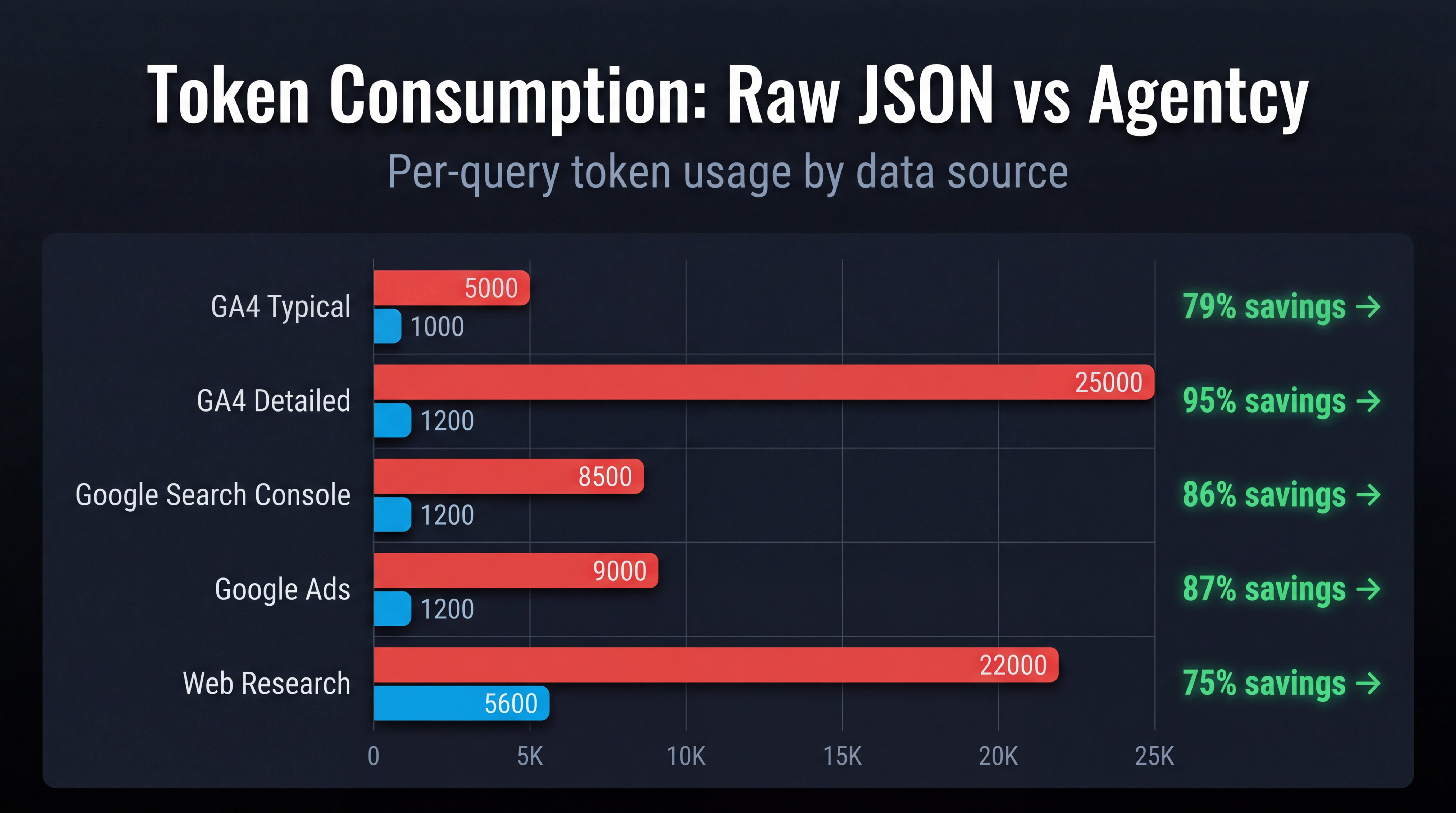
| Raw JSON MCP | Agentcy | |
|---|---|---|
| Tokens per query | ~25,000 | ~1,200 |
| Cost per query (Claude Sonnet) | ~$0.11 | ~$0.006 |
| Recommendations per response | 0 | 8-12 |
| Time to actionable insight | 5-10 min of follow-ups | 30 seconds |
| Cross-source correlation | Manual (3-5 queries) | Automatic (1 query) |
| Monthly cost at 500 queries | ~$55 in tokens | $29 plan price |
The "free" tool costs nearly twice as much as the paid one and gives you raw data instead of insights.