You run a digital agency. You manage 20 clients. Each client has their own GA4 property, Search Console site, Google Ads account, HubSpot portal, and maybe a Shopify store.
You discover MCP — the protocol that's become the standard for connecting AI to tools. The numbers are real: 17,000+ servers indexed, 520+ clients, 97 million monthly SDK downloads. Anthropic, OpenAI, Google, Microsoft, and AWS all back it. Block reports 50-75% time savings. Bloomberg went from days to minutes.
So you install free, open-source MCP servers for every platform you use.
Then you try to switch between clients.
This is the story nobody in the MCP ecosystem is telling: the protocol was designed for individual developers, not agencies managing multiple accounts. We tested every major marketing MCP server to see how they handle multi-client workflows. Some work. Most don't. A few are actively broken.
What the MCP spec says about multi-tenancy
Nothing.
The MCP specification (current revision: June 2025) contains no concept of tenant, account, workspace, client, or context switching. The protocol's core primitives are Tools, Resources, and Prompts. The only scoping mechanism is "Roots" — filesystem URIs that hint at which directories a server can access. Roots are limited to file:// URIs. They scope filesystem access, not business accounts.
The architecture overview states it plainly: "Local MCP servers that use the STDIO transport typically serve a single MCP client."
Every design assumption reflects this:
| MCP Assumption | Agency Reality |
|---|---|
| One user, one server instance | 20 client accounts, one marketer |
| Configuration at startup via env vars | Need to switch clients mid-conversation |
| Tool names are globally unique | Same tools needed for every client |
| One process per connection | 20 processes = 2GB memory, tool collisions |
| Roots scope filesystem access | Need to scope API access by business client |
| Authorization = "is this user allowed?" | Need "which client's data should I query?" |
This isn't a bug. It's a design choice. MCP was built for a developer connecting their own tools to their own AI assistant. The agency use case wasn't considered.
Server-by-server reality
We tested every major marketing MCP server to answer one question: if you manage 20 clients, how would you set this up?
The answers fall into three categories: per-query switching (works), single-account-per-instance (need 20 copies), and broken.
Google Analytics: it depends on which server
Official Google GA4 MCP (googleanalytics/google-analytics-mcp, 1,359 stars)
Google got this right. property_id is a per-query parameter on every tool call — not a config-time setting. The server uses Application Default Credentials, and every API call accepts whichever property ID you pass:
async def run_report(
    property_id: int | str,
    date_ranges: List[Dict[str, Any]],
    dimensions: List[str],
    metrics: List[str],
)
A get_account_summaries() tool lets the AI discover all available properties. One server instance, one credential, 20 properties — no restarts, no reconfiguration.
surendranb/google-analytics-mcp (182 stars)
The opposite. GA4_PROPERTY_ID is a hardcoded environment variable set at startup:
property_id = os.getenv("GA4_PROPERTY_ID")
if not property_id:
    sys.exit(1)
The property schema is cached at startup. The get_ga4_data tool has no property_id parameter. It always queries the single configured property.
Agency setup: 20 separate server instances — ga4-client-1, ga4-client-2, ..., ga4-client-20 — each with a different environment variable. Each spawning a separate process, each loading its own tool definitions.
Same platform. Same protocol. Completely different multi-client story depending on which server you chose.
Google Search Console: both servers get it right
AminForou/mcp-gsc (441 stars) and ahonn/mcp-server-gsc (168 stars) both implement site_url as a per-query parameter with a list_sites discovery tool. One instance, one credential, 20 sites.
This is the correct pattern. The Search Console API naturally encourages it since site URLs are the primary identifier.
Google Ads: structured vs. free-text
Official Google Ads MCP (googleads/google-ads-mcp, 247 stars)
Supports MCC (Manager Account) for multi-client access, but customer ID selection is extracted from natural language in the prompt — not a structured parameter:
"If you are moving between multiple customers, including the customer ID in the prompt may be simpler."
The AI is expected to parse "How many active campaigns do I have for customer id 1234567890?" and extract the customer ID from free text. This works for simple cases. It breaks when the AI misparses the ID, forgets to include it, or confuses two client IDs in the same conversation.
cohnen/mcp-google-ads (425 stars)
Better design. account_id is a structured parameter on every tool call. A list_accounts discovery tool enumerates all accessible accounts under the MCC. The AI passes the explicit account ID — no free-text extraction, no ambiguity.
Tools: list_accounts, execute_gaql_query(account_id, ...),
       get_campaign_performance(account_id, ...), ...
One server instance with MCC credentials covers all clients. The community-built server has better multi-client architecture than Google's own.
HubSpot: completely single-tenant
shinzo-labs/hubspot-mcp (30 stars) and peakmojo/mcp-hubspot (116 stars)
Both HubSpot servers configure a single HUBSPOT_ACCESS_TOKEN environment variable. The access token maps to exactly one HubSpot portal. There is:
- No portal ID parameter on any tool
- No token switching mechanism
- No per-query account selection
- No multi-portal concept at all
Agency setup for 20 HubSpot portals: 20 separate server instances, each with its own access token. Each instance loads 112 tools (shinzo-labs) or a smaller set (peakmojo). With shinzo-labs, that's 20 × 112 = 2,240 tool definitions — for one platform.
The peakmojo server has built-in FAISS vector storage for semantic search across previously retrieved CRM data — a genuinely interesting feature. But it doesn't help if you can't point it at more than one portal.
Shopify: single-store, no workaround
GeLi2001/shopify-mcp (138 stars)
The store domain is a command-line argument set at startup: --domain your-store.myshopify.com. No per-query switching. No mechanism to pass a different store URL per tool call.
Agency setup for 20 Shopify stores: 20 server instances, each with its own --domain, OAuth credentials, and API version.
WooCommerce: per-query switching, but with a catch
techspawn/woocommerce-mcp-server (80 stars)
The default store URL is configured via WORDPRESS_SITE_URL environment variable. But there's an escape hatch: each tool call can optionally provide siteUrl, consumerKey, and consumerSecret to target a different store.
This technically enables multi-store management from one instance. The problem: credentials flow through the AI conversation. The LLM sees (and potentially logs, caches, or leak) your WooCommerce API keys on every tool call. Server-side credential resolution is the secure pattern; passing secrets as tool parameters is an anti-pattern.
Meta Ads: the gold standard
pipeboard-co/meta-ads-mcp (536 stars)
Meta Ads got multi-client right. account_id is a structured parameter on every tool call (format: act_XXXXXXXXX). A get_ad_accounts discovery tool lists all accounts accessible under your Meta Business Manager. One server instance + one Business Manager credential = all client ad accounts.
This is exactly how it should work: discovery tool → structured account parameter → per-query switching.
The scorecard
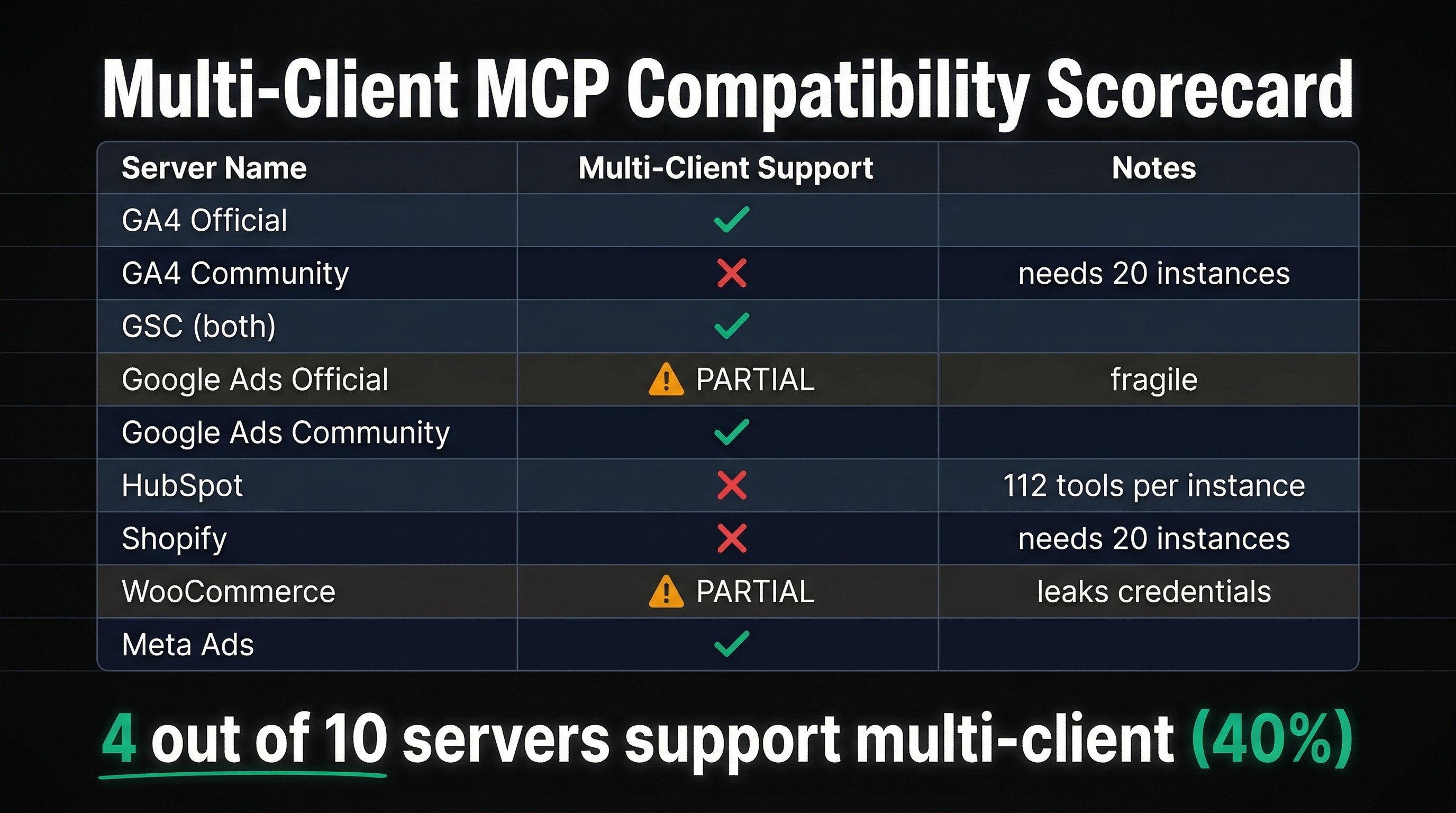
| Server | Multi-Client? | Mechanism | 20-Client Setup |
|---|---|---|---|
| GA4 (Official) | Yes | Per-query property_id | 1 instance |
| GA4 (surendranb) | No | Env var at startup | 20 instances |
| GSC (AminForou) | Yes | Per-query site_url | 1 instance |
| GSC (ahonn) | Yes | Per-query siteUrl | 1 instance |
| Google Ads (Official) | Partial | Free-text extraction | 1 instance (fragile) |
| Google Ads (cohnen) | Yes | Per-query account_id | 1 instance |
| HubSpot (both) | No | Token = portal | 20 instances |
| Shopify | No | CLI arg at startup | 20 instances |
| WooCommerce | Partial | Per-query creds (insecure) | 1 instance (leaks creds) |
| Meta Ads | Yes | Per-query account_id | 1 instance |
4 out of 10 work cleanly. The rest require either 20 separate instances or insecure workarounds.
What 20 instances actually looks like
Let's say you're an agency that uses GA4 (surendranb), HubSpot, and Shopify for all 20 clients. That's the three servers that require per-instance configuration.
Your claude_desktop_config.json would need:
- 20 GA4 server entries (
ga4-client-1throughga4-client-20) - 20 HubSpot server entries (
hubspot-client-1throughhubspot-client-20) - 20 Shopify server entries (
shopify-client-1throughshopify-client-20)
That's 60 MCP server processes running simultaneously on your machine.
Memory: Each Node.js process consumes ~50-100MB. 60 processes = 3-6GB of RAM just for MCP servers.
Tool definitions: If HubSpot (shinzo-labs) loads 112 tools per instance, 20 instances = 2,240 HubSpot tools alone. Plus 20 × GA4 tools + 20 × Shopify tools. The LLM's context window would need to hold thousands of tool definitions — most with identical names.
Tool name collisions: This is where it breaks completely.
The Cursor bug
Cursor — the most popular AI code editor — has a confirmed, documented bug with multiple instances of the same MCP server.
From the Cursor community forum:
"Cursor correctly sees 2 MCP servers, but when interacting with them, they actually connect to the same machine."
The root cause: Cursor routes tool calls based on the tool name alone. If two server instances expose the same tool name (e.g., run_report), all calls route to whichever server registered first. The second instance is silently ignored.
A separate Cursor forum post confirmed the same issue with ERP tenants. A partial fix was shipped in Cursor 2.3.21 for local stdio servers, but remote HTTP servers remain broken.
The only workaround: rename every tool with a tenant-specific suffix (run_report_client_a, run_report_client_b). This requires forking the MCP server source code for every client. Nobody does this.
The community is asking for multi-tenancy
This isn't just our observation. The MCP community has been requesting multi-tenant support for months:
GitHub Discussion #193: "Multi-Tenant Client Support" — Proposed adding _meta.clientId and _meta.clientConfig to the protocol so servers could receive per-request configuration. A maintainer questioned whether remote HTTP servers couldn't already handle this. The counterpoint: ~90% of the ecosystem is stdio-based. Forcing everyone to build custom HTTP servers defeats the purpose of a standard protocol. Not adopted. Discussion remains open.
GitHub Issue #2173: "Multi-tenancy support for all MCP servers" — Users asking to "pass authentication information while calling tools instead of configuring it at MCP server start, so different tenants can use the same server with their own credentials." No maintainer response. Issue remains open.
GitHub Discussion #234: "Multi-user Authorization" — Proposed tool-level authorization where servers declare required OAuth scopes and clients pass user tokens at call time. Use case: "a sales agent service that manages leads and opportunities on behalf of many human end-users, each needing their own OAuth tokens." Not adopted.
Superface Blog: "MCP Today: Protocol Limitations":
"In v1 deployments the same person has to both configure the server and use those tools — because v1 never standardized authorization."
"MCP ties each server to a single external service. One server, one provider. Want Marketstack and Google Sheets? You'll need to connect to two separate MCP servers."
The multi-tenant gap is well-documented. It's just not being addressed at the protocol level.
What the agency workflow actually needs
An agency marketer's workflow looks like this:
- "Show me organic traffic trends for clienta.com"
- "Now compare their Google Ads performance"
- "Switch to clientb.com — how are their HubSpot deals this month?"
- "What about their Search Console rankings?"
- "Go back to clienta.com — did that content update impact rankings?"
This requires:
- Per-query context switching — change the target client without restarting anything
- Cross-platform credentials — GA4, GSC, Ads, HubSpot, Shopify credentials per client, resolved server-side
- Credential isolation — Client A's API keys never appear in Client B's queries, and neither set flows through the AI conversation
- A discovery mechanism — "show me my clients" before "show me this client's data"
- Stateless requests — no assumption about which client was queried last
Of the 10 marketing MCP servers we tested, zero support all five requirements. The servers with per-query account switching (GA4 Official, GSC servers, cohnen's Google Ads, Meta Ads) handle #1 and #5. None handle #2, #3, or #4 across platforms.
How Agentcy handles this
Every Agentcy tool call includes a domain parameter. One parameter, one concept, all platforms:
"Show me organic traffic for clienta.com"
→ agentcy(request="organic traffic trends", domain="clienta.com")
→ server resolves: GA4 property 123456, GSC sc-domain:clienta.com
→ queries both, synthesizes results

"Now check clientb.com's HubSpot deals"
→ agentcy(request="HubSpot deals this month", domain="clientb.com")
→ server resolves: HubSpot portal 456, API key from vault
→ queries HubSpot, returns synthesized CRM analysis
The domain parameter is the context-switching primitive that MCP lacks. Behind it:
- Per-domain credential resolution — each domain has its own GA4 property ID, GSC site URL, Ads customer ID, HubSpot token, WooCommerce keys. Stored in encrypted vault storage, resolved server-side. The AI never sees credentials.
- Cross-platform config — one domain entry maps to all configured services. Adding a new platform for a client means configuring it in the portal, not editing JSON config files or spawning new server instances.
- A
list_domainsdiscovery tool — the AI calls it to see all available clients, then passes the right domain on subsequent queries. - Stateless per-request — no server-side session. Every request includes its own domain. Switch between clients mid-sentence.
| Capability | Individual MCP Servers | Agentcy |
|---|---|---|
| Switch clients per-query | 4 of 10 (partial) | Yes |
| Cross-platform credentials | No | Yes |
| Server-side credential isolation | 1 of 10 (partial) | Yes |
| Client discovery tool | 4 of 10 (single platform) | Yes (all platforms) |
| Stateless requests | 4 of 10 | Yes |
| Server instances for 20 clients | 20-60 | 1 |
| Tool definitions for 20 clients | 100-2,240 | 4 |
| Configuration changes per new client | Edit JSON, restart | Portal UI |
The security dimension
Multi-tenancy isn't just a convenience problem — it's a security problem. MCP's rapid growth has outpaced its security maturity. OWASP published an MCP Top 10 in 2026, identifying tool poisoning as the number-one attack vector — malicious instructions hidden in tool descriptions that are invisible to users but visible to AI models.
A Smithery.ai vulnerability in June 2025 exposed 3,000+ MCP servers and API keys. Independent security scans found that 30-40% of MCP servers have no authentication at all.
For agencies, this means your client's GA4 credentials, ad spend data, and customer analytics are flowing through servers that may not take security seriously. Credential isolation between clients isn't a nice-to-have — it's a requirement. Server-side credential resolution (where the AI never sees API keys) is the only secure pattern for multi-tenant workflows.
The bottom line
The MCP ecosystem has 50+ marketing servers, growing 300% quarter over quarter. It's the future of how AI connects to tools.
But it was built for developers working on their own projects — not agencies managing 20 clients across 6 platforms. The protocol has no multi-tenant primitive. Most servers hardcode a single account at startup. Cursor has confirmed bugs when you try to run multiple instances. And the community has been asking for solutions that haven't arrived.
If you manage one client on one platform, individual MCP servers work well. If you manage many clients across many platforms — that's a different problem, and it requires a different architecture.
Server behavior verified by reading source code on GitHub. Cursor bug reports from the official Cursor community forum. MCP spec citations from the June 2025 revision at modelcontextprotocol.io. All links verified February 27, 2026.