Marketers in 2026 have more ways to connect AI to their data than ever. Model Context Protocol servers. ChatGPT plugins and GPTs. Native AI features built into Google Analytics and HubSpot. Direct API wrappers. ETL pipelines feeding data warehouses. Each approach makes different trade-offs in setup complexity, data freshness, cost, and quality of output.
We've tested all six approaches against the same set of marketing questions across real client data. This is what we found.
The six approaches
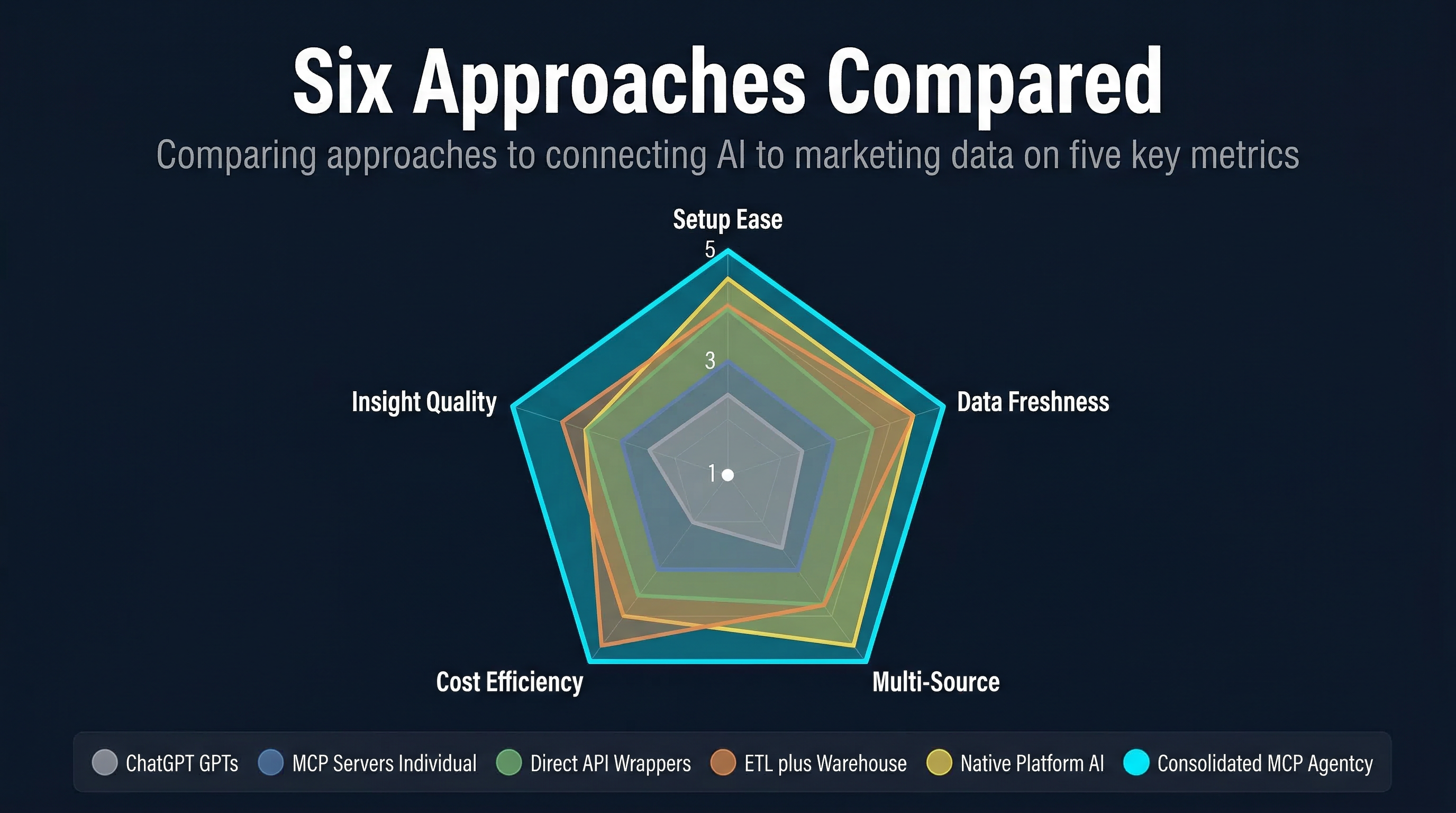
Before diving into comparisons, here's the landscape:
| Approach | How It Works | Setup Complexity | Data Freshness |
|---|---|---|---|
| MCP Servers | Open protocol connecting AI clients to external tools | Medium | Real-time |
| ChatGPT Plugins / GPTs | OpenAI's marketplace of tool integrations | Low | Varies |
| Native Platform AI | AI built into the analytics platform itself | None | Real-time |
| Direct API Wrappers | Custom code calling platform APIs | High | Real-time |
| ETL → Data Warehouse → AI | Scheduled data extraction to BigQuery/Snowflake | Very High | Delayed |
| Consolidated MCP | Single MCP server routing to multiple sources | Low | Real-time |
Let's examine each one.
Approach 1: Individual MCP servers
What it is: Install separate open-source MCP servers for each marketing platform — one for GA4, one for Search Console, one for Google Ads, one for HubSpot. Each server connects to its platform's API and exposes tools that your AI client (Claude, Cursor, Windsurf) can call.
Setup: Download the server, configure API credentials (usually in a JSON file), add it to your AI client's MCP configuration. Repeat for each platform.
Strengths:
- Open protocol — works with Claude, Cursor, Windsurf, Copilot, and dozens of other clients
- Real-time data access — queries the live API every time
- Free and open-source — no subscription fees for the server itself
- Growing ecosystem — 50+ marketing MCP servers on GitHub as of February 2026
Weaknesses:
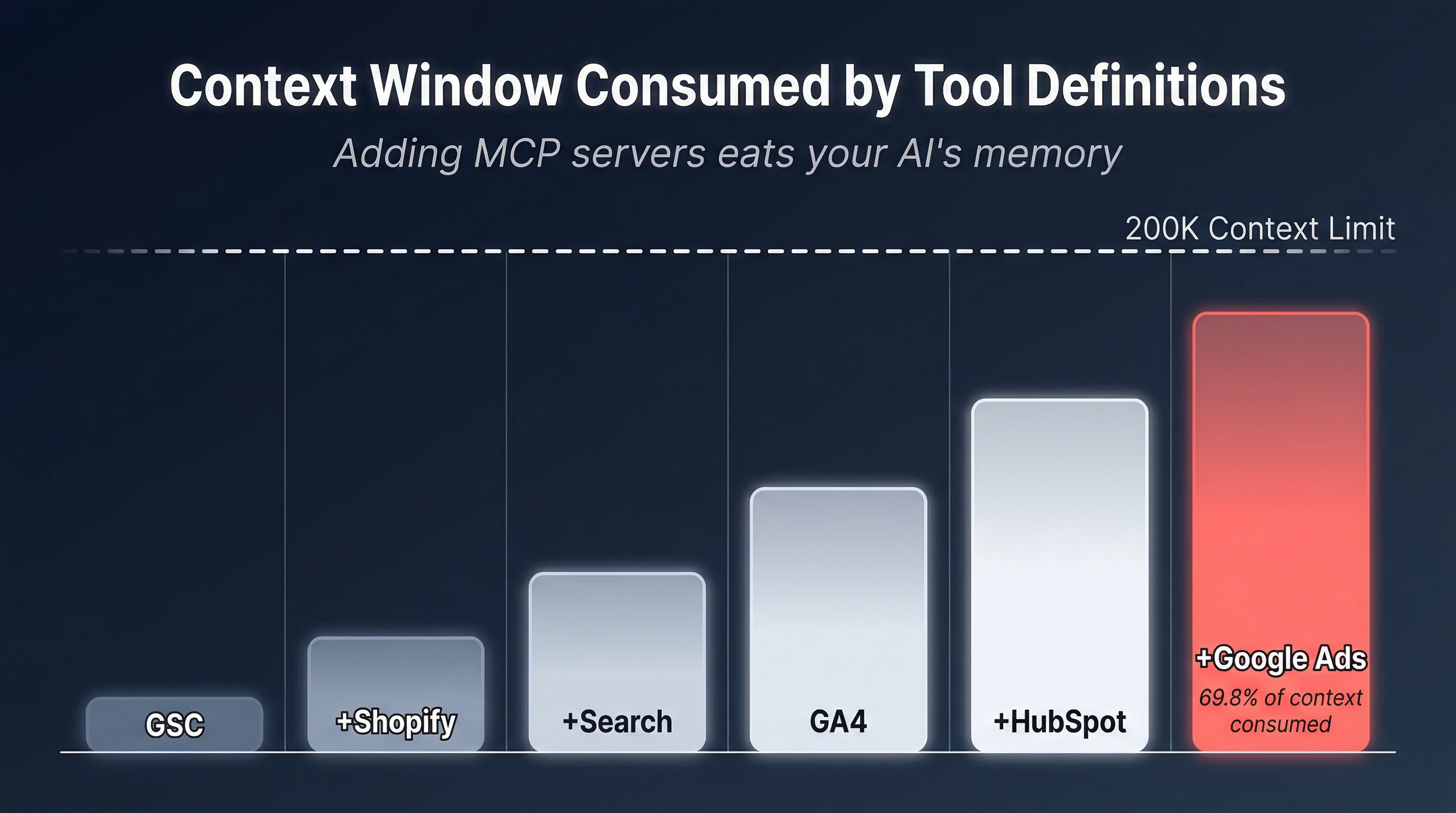
Token overhead compounds fast. Every MCP server loads its tool definitions into your AI's context window on every conversation. One server? Manageable. Six? You're looking at 139,575 tokens of overhead — 69.8% of Claude's 200K context window — before you ask a question.
We measured every major marketing MCP server's actual overhead by reading source code:
| Stack | Servers | Tools | Token Overhead | % of 200K |
|---|---|---|---|---|
| Just GSC | 1 | 8 | 2,000 | 1.0% |
| + Shopify | 2 | 22 | 5,250 | 2.6% |
| + Brave Search | 3 | 28 | 9,825 | 4.9% |
| + GA4 | 4 | 35 | 19,825 | 9.9% |
| + HubSpot | 5 | 147 | 39,325 | 19.7% |
| + Google Ads | 6 | 149 | 139,575 | 69.8% |
Google's official Ads MCP embeds a 398-kilobyte GAQL reference in its tool description. Two tools, 100,250 tokens. That single server consumes more context than the other five combined.
No cross-source correlation. If you ask "how does my organic traffic relate to my ad spend?", the AI has to make separate tool calls to GA4 and Google Ads, receive raw JSON from each, hold both responses in context, and reason across them. In practice, the context window often isn't big enough for both responses plus the tool definitions plus the reasoning.
Raw data, not insights. Every server returns raw API responses. A GA4 query returns 15-25K tokens of nested JSON with dimensionValues, metricValues, and TYPE_INTEGER headers. The AI has to interpret all of it without marketing context.
Tool count limits. Cursor enforces a practical limit of about 40 MCP tools — a performance threshold beyond which routing degrades significantly. HubSpot alone has 112 tools. Even clients without hard limits suffer — the AI routes less accurately when choosing between 149 tools.
Cost per first message (tool definitions only, Claude Opus 4.6 at $5/M input tokens):
| Stack Size | Overhead | Cost/Message |
|---|---|---|
| 1 server (GSC) | 2,000 | $0.01 |
| 3 servers | 9,825 | $0.05 |
| 6 servers | 139,575 | $0.70 |
Best for: Single-platform use cases. If you only need GA4 or only need Search Console, a single MCP server is the simplest path.
Approach 2: ChatGPT Plugins and GPTs
What it is: OpenAI's ecosystem for connecting tools to ChatGPT. Originally "plugins" (2023), evolved into "GPTs" (custom ChatGPT configurations with tool access), and now supports MCP as of early 2026.
Setup: Browse the GPT Store, find a marketing GPT, click "Use." Some require OAuth authentication with the underlying platform.
Strengths:
- Easiest setup — click a button
- Conversational interface — no technical knowledge needed
- Some GPTs include marketing-specific prompts and reasoning
- OpenAI's 400M+ weekly users means large install base
Weaknesses:
Locked to ChatGPT. Plugins and GPTs only work in OpenAI's ecosystem. If you use Claude, Cursor, Windsurf, or any other AI client — none of this is available to you.
Quality is uneven. The GPT Store has thousands of marketing GPTs, most built by individuals with no API expertise. We tested several GA4 GPTs and found common issues: hardcoded date ranges, missing dimension support, no error handling for API quotas, and responses that simply paste raw JSON.
No multi-source queries. Each GPT connects to one platform. Asking a question that requires GA4 + Google Ads data means switching between GPTs and manually correlating results.
Ephemeral context. ChatGPT's conversation context doesn't persist tool results across sessions. You can't build on yesterday's analysis without re-running all the queries.
API limits. GPT tool calls are rate-limited and subject to OpenAI's usage caps. Heavy analysis sessions can hit limits that don't exist with direct API access.
Best for: Non-technical marketers who use ChatGPT as their primary AI tool and need quick, single-platform insights without setup.
Approach 3: Native platform AI
What it is: AI features built directly into the marketing platform. GA4's "Analytics Intelligence" and natural language query bar. HubSpot's "Breeze" AI across CRM, marketing, and sales hubs. Salesforce's "Einstein" AI for predictions and recommendations.
Setup: None — it's already in the platform you're paying for.
Examples by platform:
| Platform | AI Feature | What It Does |
|---|---|---|
| Google Analytics 4 | Analytics Intelligence | Natural language queries, automated insights, anomaly detection |
| HubSpot | Breeze | Content generation, lead scoring, workflow automation, CRM summaries |
| Salesforce | Einstein | Predictive scoring, opportunity insights, next-best-action |
| Semrush | Copilot | SEO audit summaries, keyword suggestions, content briefs |
| Meta Ads | Advantage+ | Automated ad creative, audience targeting, budget optimization |
Strengths:
- Zero setup — already embedded in the platform
- Deep integration — access to proprietary data that APIs don't expose
- No token costs — the platform absorbs the AI compute
- Platform-specific context — the AI understands the data schema natively
Weaknesses:
Single-platform isolation. GA4's AI can only see GA4 data. HubSpot's Breeze can only see HubSpot data. The most valuable marketing insights — "organic traffic is up but leads are down, and our top-converting keywords changed after the last Google update" — require correlating data across platforms. No native AI can do this.
Limited questioning. Native AI features accept a narrow range of questions. GA4's natural language bar handles "what was my bounce rate last week?" but not "compare my mobile vs desktop conversion funnels against industry benchmarks and suggest optimization priorities." The AI is a feature, not a reasoning engine.
No customization. You can't change the prompts, the analysis framework, or the output format. You get what the platform decided to build.
Paywalled. HubSpot's Breeze features are limited on free/starter tiers. Salesforce Einstein requires Enterprise licenses. The AI features are upsell vehicles.
Best for: Quick single-platform insights during your normal workflow. If you're already in GA4 and want a quick traffic summary, the built-in AI is the path of least resistance.
Approach 4: Direct API wrappers
What it is: Custom code (Python, TypeScript, etc.) that calls marketing platform APIs directly, processes the results, and feeds them to an LLM via API. No MCP protocol — just code.
Setup: Write the code. Handle authentication, pagination, rate limiting, error handling, token management, and prompt engineering. For each platform.
Strengths:
- Total control — you decide what data to fetch, how to process it, and what context to provide
- Optimized token usage — strip raw responses down to just the relevant fields
- Cross-source correlation — your code combines data before the LLM sees it
- No intermediary — direct API access, no MCP overhead
Weaknesses:
Engineering cost. Building a production-quality API wrapper for GA4 alone requires handling: OAuth token refresh, property discovery, 200+ dimension/metric combinations, quota management, report pagination, data sampling detection, date range parsing, and response formatting. Multiply by every platform.
Maintenance burden. APIs change. Google deprecated Universal Analytics. Shopify deprecated REST APIs. Meta changes its Marketing API every quarter. Each change requires code updates.
Not portable. Your custom wrapper works in your codebase but doesn't integrate with Claude Desktop, Cursor, or any other AI client. It's a bespoke solution.
Prompt engineering at scale. Without a protocol, every API interaction requires custom prompt engineering — system prompts that explain the data schema, few-shot examples for query formatting, instructions for output structure. This is duplicated work across every platform.
Best for: Engineering teams building AI-powered marketing products or internal tools. Not practical for agency operations or individual marketers.
Approach 5: ETL → Data warehouse → AI
What it is: Extract data from marketing platforms on a schedule (hourly/daily), transform and load it into a data warehouse (BigQuery, Snowflake, Redshift), then query the warehouse with AI tools.
Setup: Configure ETL tool (Fivetran, Airbyte, Supermetrics) → set up warehouse → configure transforms (dbt) → connect AI query layer (Ask BigQuery, Snowflake Cortex, or custom code).
Common ETL tools for marketing data:
| Tool | Connectors | Starting Price | Warehouse Support |
|---|---|---|---|
| Fivetran | 600+ | $1/mo per MAR (Monthly Active Row) | BigQuery, Snowflake, Redshift, Databricks |
| Airbyte | 500+ | Open source / $2.50 per credit | BigQuery, Snowflake, Postgres, Redshift |
| Supermetrics | 130+ | $39/mo (marketing-specific) | BigQuery, Snowflake, Sheets, Looker |
| Funnel.io | 500+ | $1,000/mo | BigQuery, Snowflake, custom |
Strengths:
- Cross-platform data in one place — the warehouse holds everything
- Historical depth — query years of data, not just what the API returns today
- Structured + reliable — transforms guarantee data quality
- SQL interface — clean, standardized query language for AI
Weaknesses:
Complexity and cost. A production ETL + warehouse + AI stack costs $500-5,000/month for an agency, requires data engineering expertise to maintain, and takes weeks to set up properly.
Stale data. Most ETL syncs run hourly or daily. If your GA4 data is 6 hours old and you're debugging a traffic drop happening right now, you're blind. Real-time marketing decisions need real-time data.
Schema maintenance. When Google adds new GA4 dimensions or Meta changes its API schema, your dbt models break. Someone has to fix them. ETL tools handle connector updates, but transform logic is your responsibility.
Overkill for most. A solo marketer or small agency doesn't need a data warehouse. They need to ask "how's my organic traffic?" and get a useful answer in 30 seconds. ETL is for enterprises with data teams.
Best for: Enterprise marketing teams with dedicated data engineering resources, compliance/audit requirements, or multi-year historical analysis needs.
Approach 6: Consolidated MCP servers
What it is: A single MCP server that routes to multiple data sources behind a small set of semantic tools. Instead of installing one server per platform, you install one server that handles all platforms through server-side routing, query decomposition, and response synthesis.
Setup: Install one MCP server, configure your API credentials (or connect via OAuth), and you're done. The server handles routing, authentication, and response formatting for all connected data sources.
How it differs architecturally:
Individual MCP servers:
  Claude → GA4 MCP (7 tools)
        → GSC MCP (8 tools)
        → Ads MCP (2 tools, 100K tokens)
        → HubSpot MCP (112 tools)
  = 129+ tools, 131K+ tokens, AI routes across all

Consolidated MCP server:
  Claude → Agentcy (4 tools, ~587 tokens)
           → server-side: GA4, GSC, Ads, HubSpot, 15 more
  = 4 tools, ~587 tokens, server routes internally
Strengths:
Fixed token overhead. 4 tools and ~587 tokens regardless of how many data sources are connected. Adding a new source — whether it's the 6th or the 50th — adds zero tool definitions. The AI client never sees the routing complexity.
Cross-source queries in one call. "Compare my organic traffic trends with ad spend efficiency" becomes a single tool call. The server decomposes the request, queries GA4 and Google Ads in parallel, and returns a unified analysis.
Synthesized output. Instead of raw JSON, the server can process API responses before returning them — stripping bloat, compressing data, and optionally synthesizing insights with marketing context. A 25,000-token GA4 JSON response becomes a 1,200-token analysis with recommendations.
Works with every MCP client. Claude Desktop, Cursor, Windsurf, Copilot, VS Code — anything that supports MCP connects to one server and gets all data sources.
Weaknesses:
Vendor dependency. You're trusting one server to correctly route, fetch, and format data from multiple platforms. If the server has a bug in its GA4 implementation, you can't swap in a different GA4 MCP server without losing the other integrations.
Less granular control. Individual MCP servers let you craft precise API queries using the platform's native parameters. A consolidated server abstracts this through natural language, which may not support every edge case.
Cost. Individual MCP servers are free (you pay only token costs). Consolidated servers typically charge a subscription because they handle routing, synthesis, and maintenance.
Best for: Agencies managing multiple clients across multiple platforms. Marketers who need cross-source insights. Anyone hitting tool count or context window limits with individual servers.
The context window reality
The comparison table doesn't capture the most important factor: context window economics. In February 2026, here are the major models:
| Model | Context Window | Input Price/M Tokens | Cached Price |
|---|---|---|---|
| Claude Opus 4.6 | 1M tokens | $5.00 | $0.50 |
| Claude Sonnet 4.6 | 1M tokens | $3.00 | $0.30 |
| GPT-5.2 | 400K tokens | $1.75 | Free |
| GPT-4o | 128K tokens | $2.50 | $1.25 |
| Gemini 2.5 Pro | 1M tokens | $1.25 | $0.31 |
| Gemini 3.1 Pro | 2M tokens | $2.00 | $0.20 |
Larger context windows help, but they don't eliminate the problem. A 6-server MCP stack consuming 139,575 tokens burns:
| Model | % of Context Used by Tools | What's Left |
|---|---|---|
| GPT-4o (128K) | 109% — doesn't fit | Nothing |
| Claude default (200K) | 69.8% | 60,425 tokens |
| GPT-5.2 (400K) | 34.9% | 260,425 tokens |
| Claude/Gemini (1M) | 14.0% | 860,425 tokens |
| Gemini 3.1 Pro (2M) | 7.0% | 1,860,425 tokens |
On GPT-4o, the 6-server stack literally doesn't fit. On Claude's default 200K, you're left with 30% for everything else. Even on Gemini's massive 2M window, you're still burning 7% on tool definitions that provide zero analytical value.
And this is just tool definitions. The actual data responses from GA4, Ads, and HubSpot easily add another 50-100K tokens per cross-source query. On a 200K window, you're out of room after one question.
Caching helps with cost, not capacity. Claude and Gemini offer 90% discounts on cached tokens. OpenAI caches for free. But caching doesn't make the context window bigger. Those 139,575 tokens of tool definitions occupy space regardless.
Cost comparison across approaches
For a digital agency running 20 conversations per day across client accounts, using Claude Opus 4.6:
| Approach | Monthly Cost | Setup Time | Maintenance |
|---|---|---|---|
| 6 MCP servers | ~$420/mo (tokens only) | 2-4 hours | Ongoing |
| ChatGPT GPTs | $20/mo (ChatGPT Plus) | 10 min | None |
| Native platform AI | $0 (included) | 0 | None |
| Direct API wrappers | $200-500/mo (compute) | 40+ hours | Heavy |
| ETL + warehouse | $500-5,000/mo | Weeks | Heavy |
| Consolidated MCP | $29-99/mo (subscription) | 30 min | None |
The "$420/mo in tokens" for 6 MCP servers is the tool definition overhead alone — $0.70 per first message × 20 conversations/day × 30 days. This doesn't include the tokens from actual data responses or AI reasoning.
The authentication problem nobody mentions
Every approach requires authentication with each marketing platform. This is where theory meets reality:
Google platforms (GA4, GSC, Ads, YouTube, Sheets, GTM) all use OAuth 2.0. Setting up OAuth requires: creating a Google Cloud project, configuring a consent screen, generating client credentials, handling the authorization flow, and managing token refresh. If your refresh token expires (Google's 6-month policy for unverified apps), every connected service breaks simultaneously.
Meta Ads requires a Facebook Developer account, an app with Marketing API access, and a system user token. The token review process can take days.
HubSpot deprecated Private Apps in February 2026, moving to Service Keys. The migration path is straightforward, but documentation is still catching up.
Shopify deprecated legacy custom apps in January 2026. New apps require either OAuth or client credentials with 24-hour expiration. BYOK (bring your own key) is no longer practical for non-technical users.
Platform-by-platform auth setup is the hidden time cost. Installing the MCP server takes 5 minutes. Getting the right API credentials can take an afternoon — longer if you're navigating a client's Google Workspace permissions or Meta Business Manager hierarchy.
Consolidated approaches that handle auth once (OAuth flow in a portal, one-time API key entry) eliminate this per-server setup tax.
Decision framework
Use this matrix to choose your approach:
| If you are... | You need... | Best approach |
|---|---|---|
| Solo marketer, one platform | Quick GA4 or GSC insights | Native platform AI or single MCP server |
| Solo marketer, non-technical | Simple answers from marketing data | ChatGPT GPTs |
| Solo marketer, multiple platforms | Cross-source insights without engineering | Consolidated MCP |
| Small agency (5-20 clients) | Switch between clients, multiple platforms | Consolidated MCP |
| Large agency (20+ clients) | Scale across clients and team members | Consolidated MCP or ETL + warehouse |
| Enterprise marketing team | Compliance, historical data, custom models | ETL + warehouse |
| Product team building AI features | Full control, custom integration | Direct API wrappers |
The "right" approach depends on three variables:
- How many data sources? One → single MCP server or native AI. Two or more → consolidated or ETL.
- How technical are you? Non-technical → native AI or ChatGPT. Technical → any approach works.
- How many clients? One → any approach. Multiple → consolidated (for context switching) or ETL (for historical comparison).
Where this is heading
The MCP ecosystem is less than two years old and already has 50+ marketing servers. But the current state — dozens of single-purpose servers, each loading its own tools into an already-crowded context window — is a transitional architecture.
Three trends are converging:
Server-side routing will win. The MCP protocol doesn't require that every data source be a separate server. The most efficient implementations use one server with a small tool surface and route internally. This is where the ecosystem is heading — fewer, smarter servers replacing the current fragmentation.
Synthesis will become standard. Today, every MCP server returns raw API data. Tomorrow, the competitive advantage will be in what happens between the API response and the client — data stripping, cross-source correlation, marketing context injection. Raw data servers will be commodity infrastructure.
Auth will centralize. The per-server OAuth setup tax is unsustainable at scale. Expect platforms to offer remote MCP servers with built-in OAuth (Stripe, Webflow, and Salesforce are already doing this), and consolidated servers to handle auth through portals.
For now, the practical advice is simple: be intentional about what you install. Every MCP server has a cost in tokens, context window, tool count, and maintenance. Install what you need, measure what it costs, and consolidate when the overhead exceeds the value.
Try it yourself
Install one or two MCP servers for the platforms you use most. Count the tools. Check the token overhead. Ask a cross-source question and see how the AI handles correlating data from separate servers.
Then try a consolidated approach. One server, one set of credentials, one tool call for the same question.
The difference isn't theoretical. It's measurable.
All pricing, context window sizes, and tool counts verified as of February 2026. LLM pricing from Anthropic, OpenAI, and Google. Tool overhead measured by reading MCP server source code on GitHub. Token counts are estimates based on tool definition text size.